


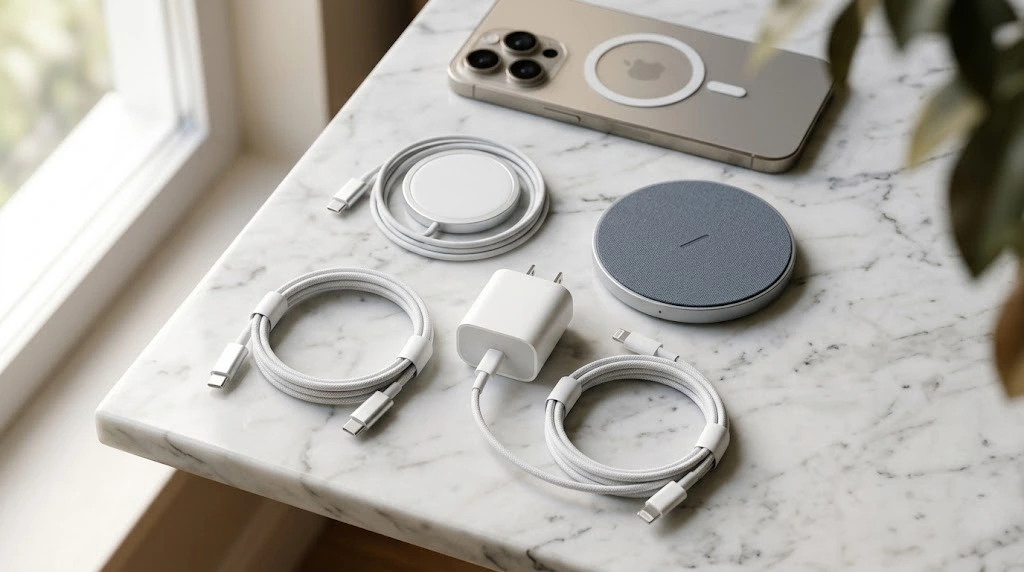
Standing in a store aisle full of cables is confusing. This guide explains the main iPhone charger types, so you can buy the right one the first time. It’s written for everyday iPhone users, whether you have a brand-new model or an older one.
Quick answer: If your iPhone is an iPhone 15 or newer, it uses USB-C. If it’s an iPhone 14 or older, it uses Lightning. Wireless chargers work with many models of both kinds.
What Charger Does Your iPhone Need?
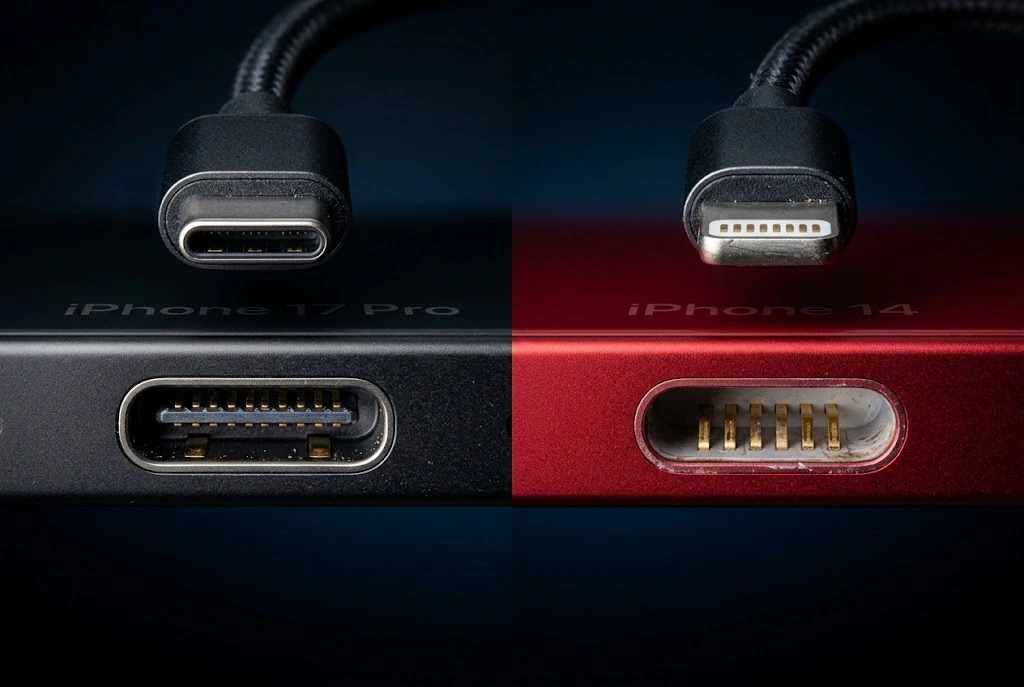
Here is the short version. Find your iPhone in the table, then keep reading for the details.
| Your iPhone | Port type | Cable you need |
|---|---|---|
| iPhone 15, 16, 17 and newer | USB-C | USB-C to USB-C |
| iPhone 16e, 17e and iPhone Air | USB-C | USB-C to USB-C |
| iPhone 14 and older | Lightning | USB-C to Lightning |
| iPhone SE (2nd and 3rd generation) | Lightning | USB-C to Lightning |
Key takeaway: The port on the bottom of your iPhone decides your cable. Your power adapter (the block you plug into the wall) decides how fast you charge.
iPhone Charger Types at a Glance
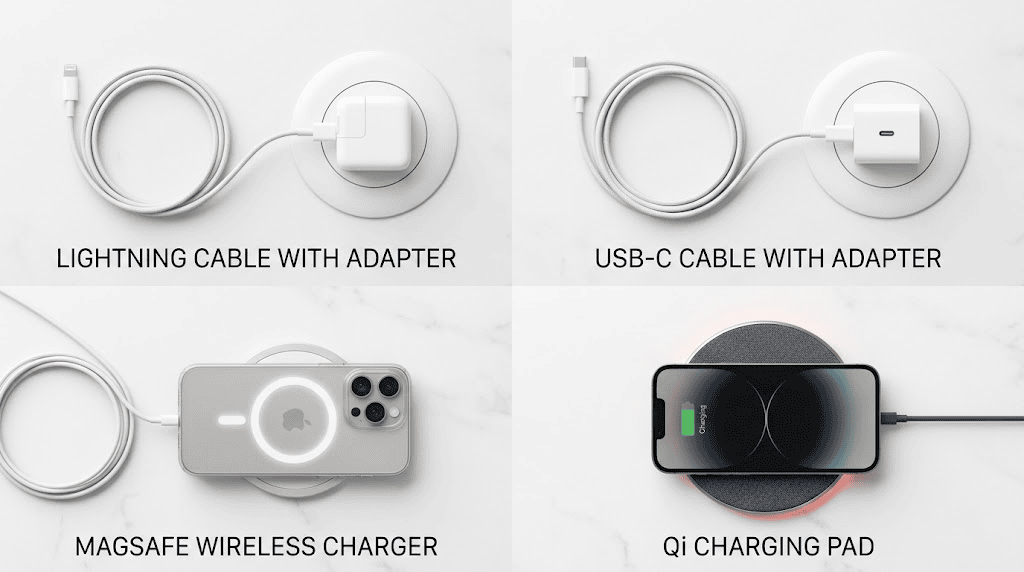
Every iPhone uses one of four main charging methods. Some iPhones can use more than one.
Lightning Charger
Apple introduced the Lightning connector with the iPhone 5 in 2012. It’s a small, flat plug that works in either direction. You can plug it in upside down and it still fits.
A Lightning charger is really a cable. You pair it with a power adapter. Many people still own one, which is why you’ll see “old iPhone charger type” in searches.
Lightning is slower for data than USB-C. For charging, though, it works well on every Lightning iPhone.
USB-C Charger
Starting with the iPhone 15, Apple switched to USB-C. The plug is slightly larger and oval-shaped. It’s also reversible.
Here’s why this matters:
- One cable can charge your iPhone, iPad, MacBook and many Android phones.
- USB-C supports faster charging with the right adapter.
- Laws in the European Union that require a common charging port helped push the change.
Searches such as “iphone type c” and “apple usb c charger” are really about this switch. If you own an iPhone 15 or newer, USB-C is what you need.
MagSafe and Qi2 Wireless Chargers
MagSafe is Apple’s magnetic wireless charging system. It started with the iPhone 12. Magnets inside the phone line up with the charger, so it snaps into the right spot.
Qi2 is an open wireless standard built on the same magnetic idea. Many Qi2 chargers are made by other brands. Always check a charger’s compatibility list for your exact model before you buy.
Standard Wireless (Qi) Charger
Basic Qi chargers are flat pads. They work with iPhone 8 and later. There are no magnets, so you have to place the phone carefully. Charging is slower than MagSafe. Apple lists up to 7.5W for these older pads.
Which Charger Does Each iPhone Model Use?
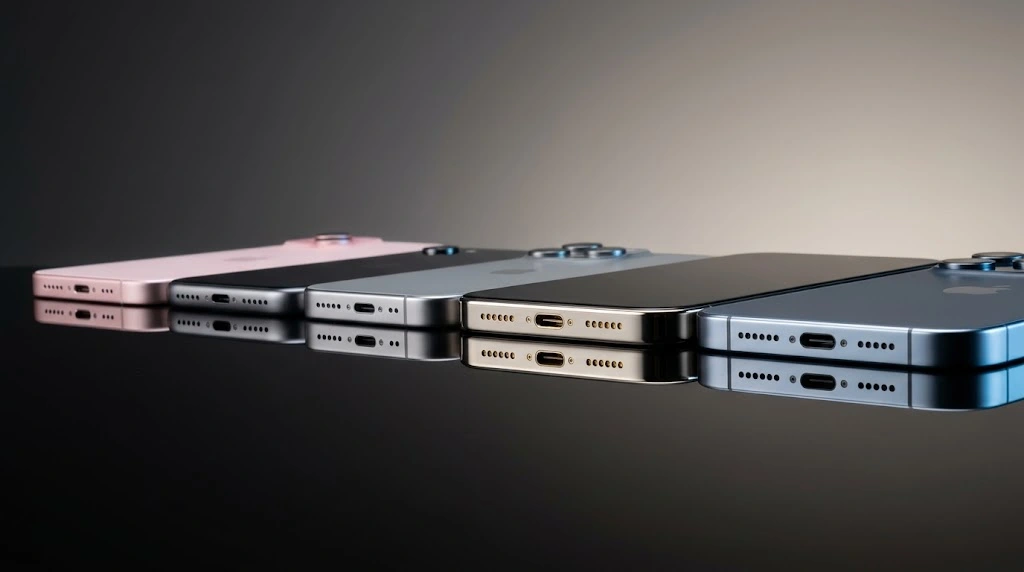
Models differ, so here’s a clear breakdown.
iPhone 15, 16 and 17 Series (USB-C)
Every iPhone from the iPhone 15 onward has a USB-C port. That includes the standard, Plus, Pro and Pro Max models. It also includes the iPhone 16e and iPhone Air.
If you own one of these, you need a USB-C cable and a USB-C power adapter. Our guide to the iPhone 16 charger covers more buying details for that model. You can also see what’s new with the iPhone 17 Pro Max and the iPhone 18 Pro.
Good to know: Newer iPhones, including iPhone 17 and iPhone 18 Pro, have the same USB-C port. What changes is how much power they can take in, which we cover in the wattage section.
iPhone 5 to iPhone 14 (Lightning)
Every iPhone from the iPhone 5 through the iPhone 14 uses a Lightning port. That’s a long list, including the iPhone 8, X, 11, 12 and 13.
For these phones you have two choices:
- Use a classic USB-A to Lightning cable with an older adapter (slower).
- Use a USB-C to Lightning cable with a USB-C adapter (faster).
iPhone SE Models
The iPhone SE (2nd and 3rd generation) uses Lightning. The newer iPhone 16e and iPhone 17e are different. They use USB-C.
The “SE” and “e” names look similar, so check your model before you buy anything.
How to Tell Which Port Your iPhone Has
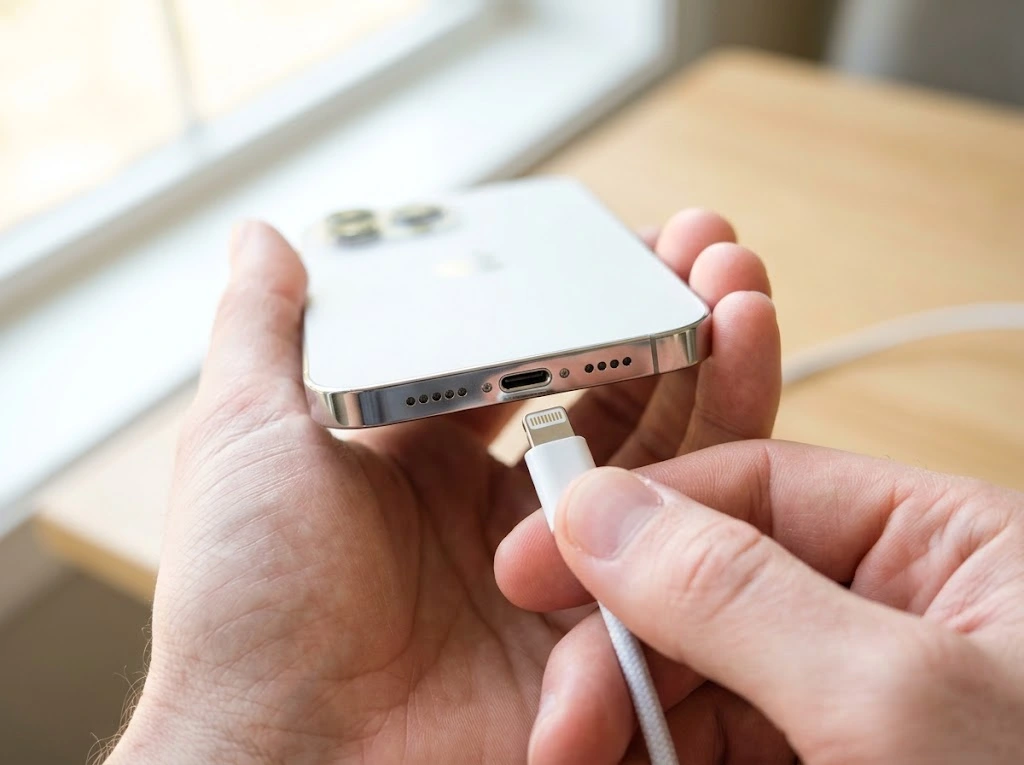
Not sure what you have? Try these quick steps.
- Look at the bottom of your iPhone. Find the port between the speaker grilles.
- Compare the shape. A thin, narrow slot is Lightning. A wider oval slot is USB-C.
- Check your model name. Open Settings > General > About and read the Model Name.
- Match it to the table above.
Still unsure? Our guide on how to find out what iPhone you have walks through five easy methods.
Tip: If you ever have trouble plugging in a cable, lint may be blocking the port. See how to clean an iPhone charging port before you assume the cable is broken.
iPhone Charging Cables Explained
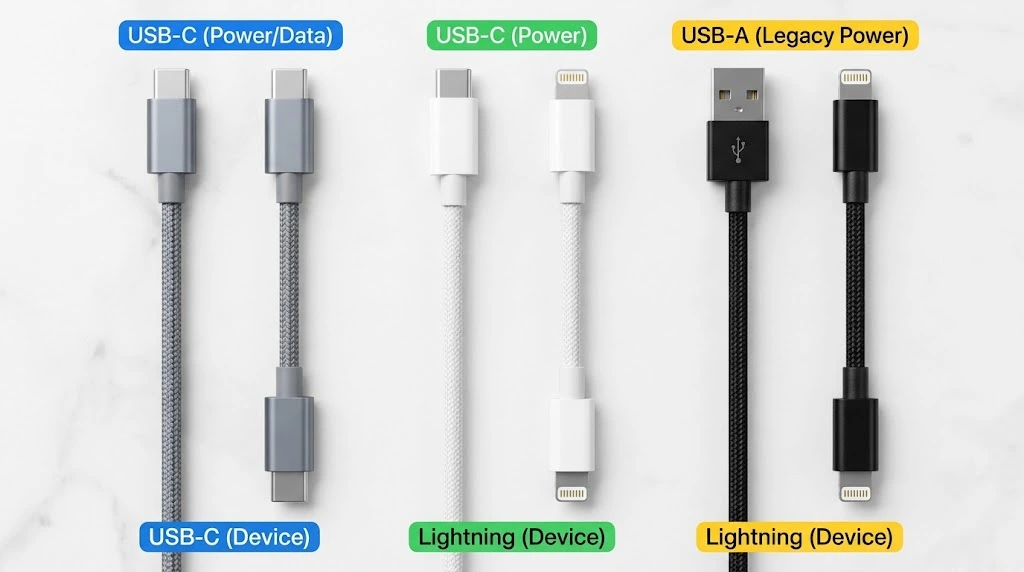
The cable is where most buying mistakes happen. Let’s make it simple.
USB-C to USB-C vs USB-C to Lightning
You’ll see these two names everywhere.
| Cable | Plug on the iPhone end | Works with |
|---|---|---|
| USB-C to USB-C | USB-C | iPhone 15 and newer |
| USB-C to Lightning | Lightning | iPhone 14 and older |
| USB-A to Lightning | Lightning | iPhone 14 and older (slower) |
A Lightning cable will never fit a USB-C iPhone. The shapes are different. So an iPhone Lightning cable from your old phone can’t charge a new iPhone 17 directly.
Newer iPhones usually include a USB-C cable in the box. Apple stopped including a power adapter back in the iPhone 12 era. You’ll need to supply your own adapter.
Data Speed vs Charging Speed
Charging and file transfer are two different jobs. On the iPhone 15 and 16 series, the standard models transfer data at slower USB 2 speeds. The Pro models support faster USB 3 speeds, but only with a cable that supports them.
For charging, almost any good USB-C cable works. For fast file transfers, check the cable’s description.
Are Third-Party and MFi Cables Safe?
Yes, if they’re certified. For Lightning accessories, look for the Made for iPhone (MFi) label on the package. That means the maker followed Apple’s rules.
Avoid very cheap, unbranded cables. They can overheat, charge slowly or stop working after a few weeks. A damaged cable can also cause a “not charging” problem. If that happens, try our iPhone not charging fixes.
Warning: Stop using any cable with frayed wires, bent metal ends or a burning smell.
iPhone Power Adapters and Wattage
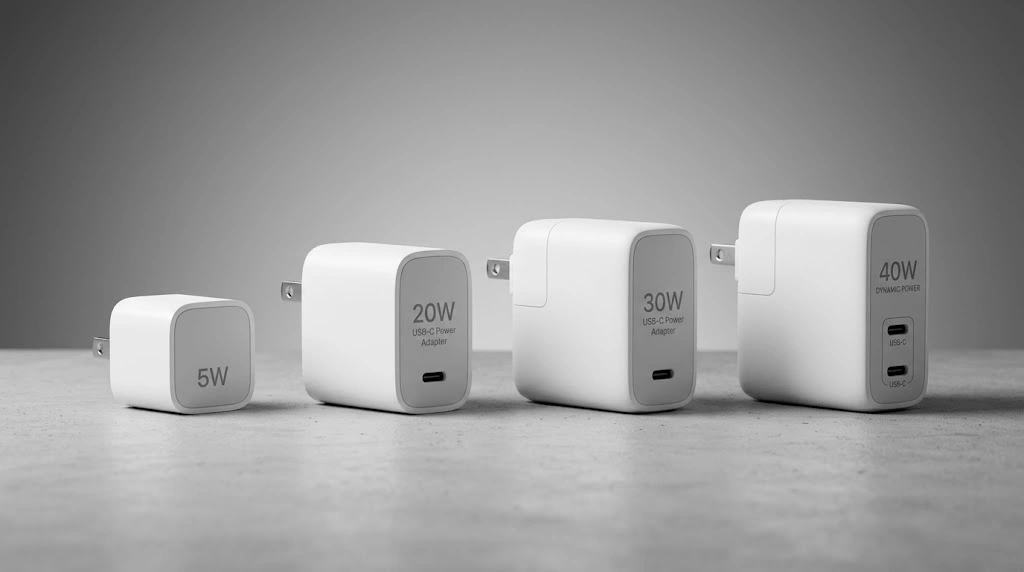
Think of the adapter as the faucet. The cable is the pipe. A bigger faucet can fill the tank faster, but only if the tank can take it.
What Wattage Means
Wattage (W) tells you how much power an adapter can deliver. More watts can mean faster charging, up to your iPhone’s limit.
To check your adapter, look at the small print on the top or bottom of the block. Apple adapters print the wattage there.
Adapters Compared
| Adapter type | Typical wattage | Best for |
|---|---|---|
| Old square “cube” | 5W | Very slow charging |
| Apple 20W USB-C adapter | 20W | iPhone 8 up to iPhone 16, plus iPhone 17e and iPhone Air |
| Apple 30W USB-C adapter | 30W | MagSafe charging on newer models |
| Apple 40W Dynamic Power Adapter | 40W (60W max) | iPhone 17 Pro series and iPhone 18 Pro |
An iPhone charger adapter doesn’t have to come from Apple. A good third-party adapter works if it supports USB Power Delivery (USB-PD). That’s the standard that lets the adapter and phone agree on a safe power level.
Key takeaway: Buying a bigger adapter won’t hurt your iPhone. The phone only takes what it can handle. But it won’t charge faster than its own limit.
Fast Charging: What You Really Need
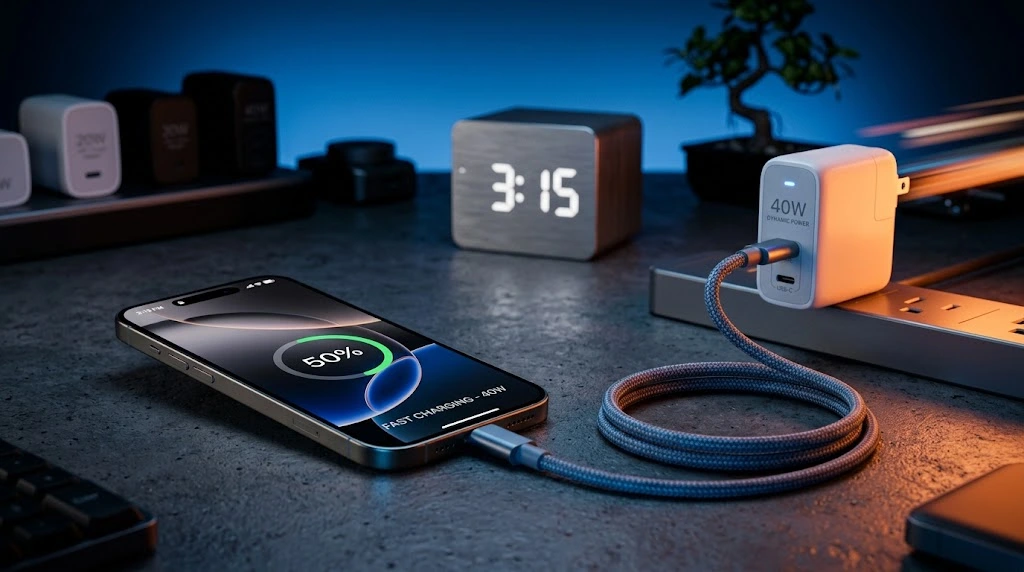
Most people just want a quick top-up. Good news: fast charging is easy to set up. According to Apple’s support page, you need the right cable and the right adapter.
Here’s what Apple says for each group of iPhones.
| iPhone model | Adapter to use | Apple’s fast-charge claim |
|---|---|---|
| iPhone 18 Pro and Pro Max | 40W (60W max) adapter with the 60W cable in the box | About 50% in around 15 minutes |
| iPhone 17, 17 Pro, 17 Pro Max | 40W adapter or higher | About 50% in around 20 minutes |
| iPhone 17e and iPhone Air | 20W adapter or higher | About 50% in around 30 minutes |
| iPhone 15 and 16 series | 20W adapter (Apple lists 18W or greater) | Around 50% in about 30 minutes |
Apple’s numbers come from lab tests. Your results will vary with your settings, your apps and the temperature.
“Fast charging might not work in conditions that are too cold or too hot.” — Apple Support
That’s a handy reminder. If your iPhone feels hot, it may slow down on purpose to protect the battery. Learn more in our guide on iPhone overheating.
Do You Need a Fast Charger for iPhone?
Not always. Think about how you charge:
- Charging overnight? A basic 20W adapter is plenty.
- Quick top-ups before leaving home? A faster adapter saves real time.
- Own a Pro model? A higher-wattage adapter helps you get the full speed.
Older Lightning iPhones can fast charge too. Use a USB-C to Lightning cable with a 20W or stronger USB-C adapter. You don’t need new hardware.
Fast Charger Checklist
- USB-C power adapter, not the old USB-A cube
- USB-PD support listed on the box
- Wattage that matches your model
- A cable that supports the same power level
Wireless Charging: MagSafe, Qi2 and Qi
Wireless charging is slower than a good wired setup. But many people love the convenience. You set the phone down, and it charges.
How the Three Wireless Types Differ
| Type | Magnets | Works with | Speed |
|---|---|---|---|
| MagSafe | Yes | iPhone 12 and later | Up to 15W on older models, faster on newer ones |
| Qi2 | Yes | Many newer iPhones (check compatibility) | Varies by charger |
| Qi | No | iPhone 8 and later | Up to 7.5W |
Apple’s support page says iPhone 16, iPhone 17 and iPhone Air can use a MagSafe Charger with a 30W (or stronger) USB-C adapter. For iPhone 15 and earlier, MagSafe fast charging tops out at 15W with a 20W or higher adapter. The iPhone 18 Pro models pair MagSafe with an even stronger adapter, 35W or higher, per Apple.
You can read Apple’s own explanation on its MagSafe Charger support page. Want accessory ideas? Browse our MagSafe accessories section.
Wireless Charging Tips
- Take thick or metal cases off if charging stalls.
- Don’t put credit cards between the phone and the charger.
- Keep the phone centered on the pad.
- Expect it to run a little warmer than wired charging.
Note: Wireless charging works best for desks and nightstands. For speed, a cable is still the winner.
Can You Use an Old iPhone Charger on a New iPhone?
This is one of the most common questions. The answer depends on which part is old.
| What you have | Works with a USB-C iPhone? | Notes |
|---|---|---|
| Old Lightning cable | No | The plug won’t fit |
| Old 5W cube adapter | Only with a USB-C cable | Very slow |
| USB-C cable from an iPad or MacBook | Yes | Great option |
| USB-C adapter from an iPad or laptop | Yes | Works if it supports USB-PD |
| Old Lightning wireless pad (Qi) | Yes | Slower speeds |
So your old iPhone charger type might be half useful. The adapter block often still works. The Lightning cable usually doesn’t.
Going the other direction is easy. A newer USB-C adapter works with older Lightning iPhones. You just need a USB-C to Lightning cable.
Tip: Before you throw away old cables, label them. Lightning cables are still handy for AirPods cases, older iPads and some accessories.
Power Banks and Other Charging Accessories
You’re not limited to wall charging. A few extras can help.
iPhone Power Bank Basics
An iPhone power bank is a portable battery. Look for these features:
- USB-C output with USB-PD, so it can fast charge
- At least 20W of output for modern iPhones
- A capacity that fits your needs (10,000 mAh gives roughly two full charges for many phones)
- Safety certifications printed on the label
Some power banks snap on the back of your iPhone using magnets. These are handy for travel. They’re slower than a wired power bank, though.
Car Chargers
Car chargers need USB-PD too. Pick one with a USB-C port, and use a quality cable. Cheap car adapters are a common cause of slow charging.
Multi-Device Charging Stations
Charging stations hold your iPhone, Apple Watch and AirPods together. They save space on a nightstand. Check that the iPhone spot supports MagSafe or Qi2 if you want faster speeds.
How to Choose the Right iPhone Charger
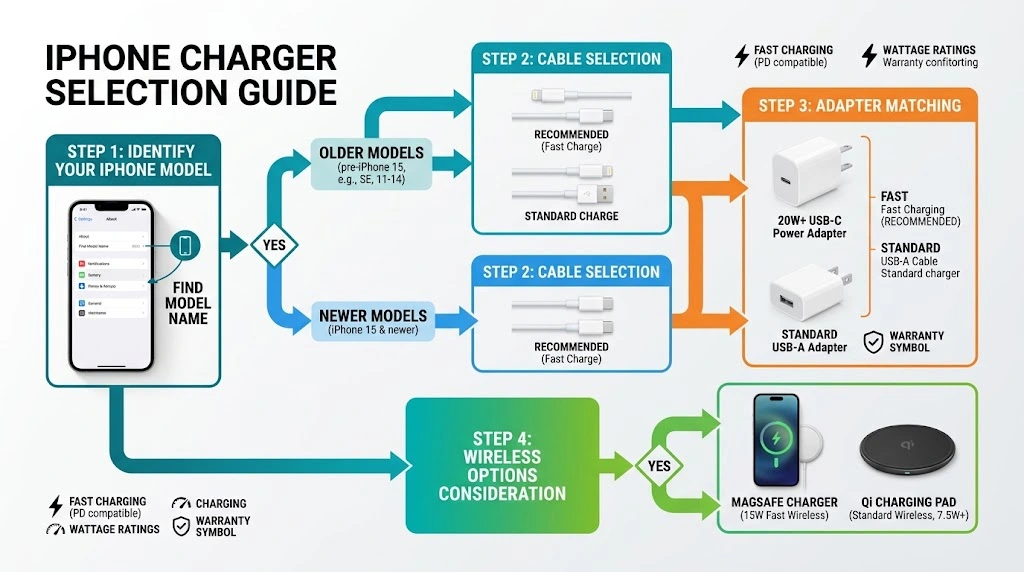
Use this simple five-step method.
- Identify your model. Look at the table near the top of this article.
- Pick your cable. USB-C to USB-C for iPhone 15 and newer. USB-C to Lightning for older phones.
- Pick your adapter. Use the wattage table to find a good match.
- Decide if you want wireless. MagSafe or Qi2 is nice for desks and nightstands.
- Buy certified gear. Choose well-known brands, and look for certification marks.
Quick Buying Rules
- Short on budget? A 20W USB-C adapter and a certified cable cover most iPhones.
- Own a newer Pro model? Spend a little more on a higher-wattage adapter.
- Travel often? Pick a compact adapter and a power bank with USB-PD.
- Share chargers with an iPad or laptop? USB-C makes that easy.
Apple also sells adapters and cables. See the Apple Store charger page for current options. You can also review Apple’s power adapter guide for iPhone.
Charging Safety and Battery Health Tips
A good charger protects your battery. A bad one can hurt it. Follow these habits.
Safe Charging Do’s
- Use certified chargers and cables.
- Keep your iPhone cool. Take the case off if it gets warm.
- Charge on a hard, flat surface, not under a pillow.
- Turn on Optimized Battery Charging in Settings > Battery > Charging.
- Look for a charge limit option on newer models, which can help battery health over time.
Charging Don’ts
- Don’t use frayed or damaged cables.
- Don’t charge in direct sun or a hot car.
- Don’t use unbranded, no-name adapters.
- Don’t force a plug into the port. Clean the port instead.
Watch Your Battery Health
Over the years, every battery wears down. Check yours often. Our guide on how to check battery health on iPhone shows you how.
If your battery drains quickly even with a good charger, read about iPhone battery draining fast. When the battery is worn out, a battery replacement may be the real fix.
Warning: If your iPhone swells, smells burnt or becomes too hot to hold, stop charging it. Contact Apple Support or an authorized repair provider.
Frequently Asked Questions
What type of charger does my iPhone use?
It depends on your model. iPhone 15 and newer use USB-C. iPhone 14 and older use Lightning. Check the port at the bottom of your phone, or look up your model name in Settings > General > About.
Is the iPhone charger USB-C or Lightning?
Both exist. Newer iPhones, starting with the iPhone 15, use USB-C. Older models, including the iPhone 14 and the iPhone SE (3rd generation), use Lightning. The iPhone 16e and iPhone 17e use USB-C.
Can I use an old Lightning charger with an iPhone 17?
No. A Lightning cable doesn’t fit a USB-C port. You’ll need a USB-C cable. Your old power adapter can still work if you pair it with a USB-C cable, but it may charge slowly.
Do I need a 20W charger to fast charge my iPhone?
For many models, yes. A 20W USB-C adapter works for most iPhones, and Apple lists an 18W or greater adapter for iPhone 15 and later. The iPhone 17 Pro series and iPhone 18 Pro use stronger adapters for the fastest speeds. Check the table in this guide for your model.
Are third-party iPhone chargers safe?
Yes, if they come from a trusted brand and are certified. Look for USB-PD support on USB-C adapters and the Made for iPhone (MFi) label on Lightning accessories. Avoid unbranded, very cheap chargers.
Final Verdict
Understanding iPhone charger types takes just a few minutes. Here’s the recap:
- iPhone 15 and newer use USB-C. iPhone 14 and older use Lightning.
- Your cable has to match your port.
- Your adapter’s wattage controls how fast you charge.
- MagSafe, Qi2 and Qi are great for convenience, but wired charging is usually faster.
- Certified gear keeps your iPhone and your battery safe.
Check your model, pick the right cable, and match the adapter to your needs. That’s all it takes to charge with confidence.
Keep learning: If charging still isn’t working, try our iPhone not charging fixes. If you’re shopping for a new phone, see the iPhone 17e guide.
Sources:
- Fast charge your iPhone – Apple Support
- Power adapters for iPhone – Apple Support
- MagSafe Charger – Apple Support

