


Why You Need a Screen Protector for Your iPhone
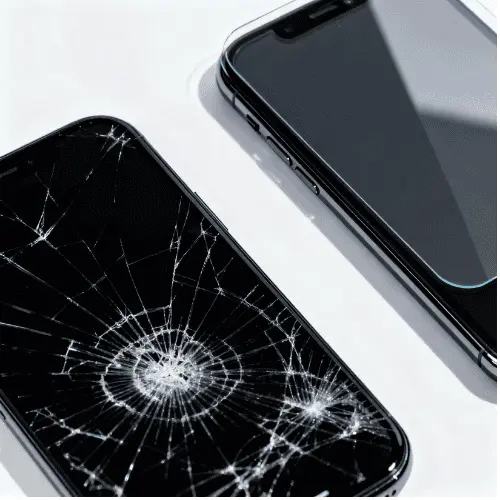
Did you know that replacing a cracked iPhone screen can cost between $129 and $379 at an Apple Store? That’s a lot of money for something that could have been prevented with a simple screen protector costing just $15 to $40.
Your iPhone’s display is its most vulnerable part. Whether you’re checking messages, taking photos, or watching videos, your screen faces constant threats from keys, coins, drops, and everyday wear. Even with Apple’s Ceramic Shield technology on newer models, scratches and cracks still happen.
Here’s what this guide covers: You’ll discover the best iPhone screen protectors in 2025, learn about different types like tempered glass screen protector options, understand key features like 9H hardness, and get expert installation tips. By the end, you’ll know exactly which screen protection solution fits your lifestyle and budget.
Quick Takeaway: Investing $20–40 in a quality glass screen protector can save you hundreds in repair costs and preserve your iPhone’s resale value.
Quick Picks: Best iPhone Screen Protectors at a Glance

Not sure where to start? Here are our top recommendations for 2025:
| Category | Product | Price | Best For | Key Feature |
|---|---|---|---|---|
| Best Overall | Flolab NanoArmor 6 | $40 | Complete protection | 94.5% coverage, 93% clarityyoutube |
| Best Value | Spigen GlasTR EZ Fit | $15-25 | Easy installation | Auto-align tray, great warranty |
| Best Budget | JETech Tempered Glass | $8-15 | Multiple packs | Affordable quality |
| Best Privacy | ZAGG Glass Elite Privacy 360 | $35-50 | Public use | 4-way privacy filter |
| Best Premium | Belkin ScreenForce UltraGlass | $25-40 | Maximum clarity | 2x stronger than standard glass |
| Best Warranty | ZAGG InvisibleShield | $25-45 | Peace of mind | Lifetime replacement |
Each of these protectors has been tested extensively and offers excellent protection for your iPhone screen.
Types of Screen Protectors Explained
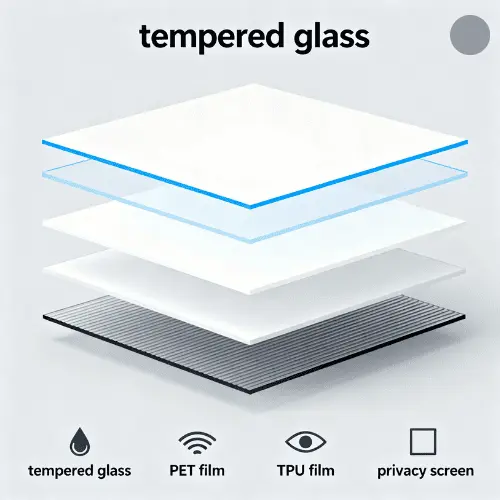
Choosing the right screen protector starts with understanding what’s available. Let’s break down each type so you can make an informed decision.
Tempered Glass Screen Protectors (Most Popular)
Tempered glass screen protector options are the gold standard for iPhone screen protector choices in 2025. They’re made from multiple layers of glass heated to extreme temperatures, creating a shield that’s both protective and responsive.
What is 9H Hardness?
You’ll see “9H hardness” everywhere when shopping for glass protectors. This refers to the pencil hardness scale, where 9H is the highest rating. It means your screen protector can resist scratches from most everyday objects like keys, coins, and even some sharp tools.
Pros:
- Excellent scratch resistance
- Feels like your original screen
- 93-99% clarity maintains display quality
- Absorbs impact from drops
- Easy to clean
Cons:
- More expensive ($15-40)
- Can crack from severe impacts
- Slightly thicker than film options
Best for: Anyone wanting comprehensive daily protection with a natural feel.
PET Film Screen Protectors
PET (polyethylene terephthalate) film is a thin plastic screen cover that’s been around for years.
Characteristics:
- Ultra-thin and lightweight
- Budget-friendly ($5-15)
- Basic scratch protection
- 85-90% clarity
When to Choose PET:
If you’re on a tight budget and mainly need protection from light scratches, PET film works. However, it won’t protect against drops and can yellow over time.
TPU Film Screen Protectors
TPU (thermoplastic polyurethane) offers something unique: self-healing properties. Minor scratches disappear on their own within 24-48 hours.
Flexibility Advantages:
- Absorbs impact better than glass
- Wraps around curved edges
- More durable against drops
Drawbacks:
- Rubbery feel that some users dislike
- Harder to install without bubbles
- Slightly less clarity than glass
Privacy Screen Protectors for iPhone
Privacy screen protector iPhone options have exploded in popularity, with a 26% increase in demand in 2025. They work by using micro-louver technology that blocks viewing angles beyond 30-45 degrees.
2-Way vs 4-Way Privacy:
- 2-way: Blocks left and right viewing (landscape mode)
- 4-way: Blocks all four sides (portrait and landscape)
Trade-offs:
While you gain privacy in public spaces, expect slightly reduced brightness (85-90% light transmission) and a minor tint to your display.
Expert Tip: If you frequently work with sensitive information on your iPhone in coffee shops, airports, or offices, a privacy screen protector is worth the investment.otterbox
Matte/Anti-Glare Screen Protectors
These protectors feature a textured surface that diffuses light, reducing glare significantly.
Best for:
- Outdoor use under direct sunlight
- Reducing fingerprint visibility
- Artists using Apple Pencil (iPad users)
Clarity: 80-85% (noticeable reduction in sharpness)
Blue Light Filter Screen Protectors
With the average person spending 4+ hours daily on their phone, blue light filter protectors help reduce eye strain and may improve sleep quality.
Features:
- Filters 30-50% of blue light
- Slight amber/yellow tint
- 88-93% clarity
- Price: $18-35
Key Features to Look For in a Screen Protector
Not all screen protectors are created equal. Here’s what separates excellent products from mediocre ones.
1. Hardness Rating (Understanding 9H)
The 9H hardness screen protector rating is your first indicator of quality. However, there’s a catch: 9H on the pencil scale doesn’t mean it can’t be scratched. Sand and certain minerals can still damage it because they rank higher on the Mohs hardness scale.
What 9H Really Means:
Your tempered glass screen protector will resist scratches from:
- Keys and coins ✓
- Zippers ✓
- Most pocket debris ✓
- Sharp knife edges (usually) ✓
But not from:
- Sand (Mohs 7) ✗
- Diamond ✗
2. Oleophobic Coating (Anti-Fingerprint Magic)
This invisible coating repels oils from your fingers, keeping your screen cleaner longer. Every quality glass screen protector should have it.
Reality Check: Oleophobic coatings wear down over 6-12 months with regular use. When you notice more fingerprints sticking, it’s time to replace your screen guard.
3. Edge-to-Edge Coverage vs Case-Friendly Design
This is where many people make mistakes. Edge-to-edge screen protector options look great but can lift or crack when used with certain cases.
Case-Friendly Design:
These protectors are slightly smaller, leaving a tiny border around the screen edge. They work with 99% of iPhone cases without conflict.
Which Should You Choose?
- No case or thin case → Edge-to-edge
- Thick protective case → Case-friendly design
4. Thickness (The Sweet Spot: 0.2mm – 0.4mm)
Thinner isn’t always better. Here’s the breakdown:
| Thickness | Protection Level | Touch Sensitivity | Best For |
|---|---|---|---|
| 0.2-0.25mm | Light | Excellent | Touch ID devices |
| 0.3-0.33mm | Good | Very Good | Standard use |
| 0.4mm+ | Maximum | Good | Heavy-duty protection |
5. Clarity and Light Transmittance
Premium tempered glass screen protectors offer 93-99% light transmission, meaning your display looks nearly identical to bare glass.
Warning Signs of Low Quality:
- Rainbow effect (Newton Rings)
- Cloudy appearance
- Color distortion
- Below 90% transmittance
6. Touch Sensitivity
Your phone screen protector should feel invisible. Modern tempered glass maintains full touch responsiveness, including:
- 3D Touch (older models)
- Haptic Touch
- Swipe gestures
- Gaming responsiveness
7. Face ID and Touch ID Compatibility
This is crucial. Some thick or poorly designed screen protectors can interfere with biometric sensors.
Touch ID Tip: After installing your screen protector, go to Settings → Touch ID & Passcode and re-scan your fingerprint. This dramatically improves recognition rates.
8. Installation Method (Easy Align Tray Technology)
The difference between a frustrating installation and a perfect one often comes down to the included tools.
Best Systems:
- Spigen EZ Fit: Auto-alignment tray
- Belkin Easy Align: Face-down installation guideyoutube
- ZAGG EZ Apply: Tray-based system
These systems virtually eliminate misalignment and bubbles, even for first-time installers.
How to Choose the Right Screen Protector for Your iPhone
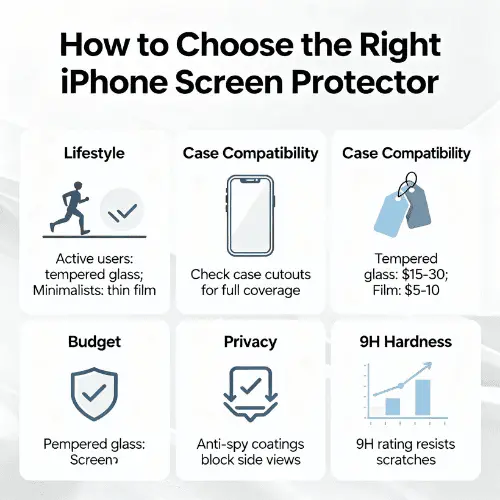
Your perfect iPhone screen protector depends on how you actually use your phone. Let’s match you with the right option.
Consider Your iPhone Model
Different iPhone models need specific protectors:
- iPhone 16 series: Look for “iPhone 16 screen protector” specifically designed for the new dimensions
- iPhone 15: Compatible with many iPhone 16 protectors
- iPhone 14/13: Widely available, often in multi-packs
- Pro Max models: Need larger protectors; standard versions won’t fit
Always verify compatibility before purchasing. Many manufacturers like Belkin Screen Protector offer model-specific options.
Match Your Lifestyle and Usage Patterns
Office Workers: Choose a privacy screen protector iPhone option to prevent shoulder surfing during meetings, commutes, or in coffee shops.
Outdoor Enthusiasts: Get a matte/anti-glare protector to reduce sun glare and improve visibility in bright conditions.
Clumsy Users: Invest in a premium 9H hardness tempered glass with maximum thickness (0.4mm) for drop protection.
Night Owls: Consider blue light filter protectors to reduce eye strain during late-night scrolling.
Budget-Conscious: JETech or Mr. Shield offer reliable screen protection at $8-15 for multiple packs.
Case Compatibility Matters
This is where many people run into problems. Your screen protector and case must work together.
Check These Points:
- Does your case have a raised lip around the screen?
- Is it an ultra-protective case like OtterBox?
- Does the manufacturer mention case compatibility?
If your case has a thick raised lip, choose a “case-friendly” or slightly smaller screen guard to prevent lifting edges.
Pro Tip: If you’re buying from Best iPhone 16 Pro Max Cases on our site, check the screen protector compatibility notes in the product description.
Budget Considerations
Here’s the realistic price breakdown for quality screen protectors in 2025:
- Budget ($8-15): JETech, Mr. Shield – Basic protection, good for careful users
- Mid-Range ($15-25): Spigen, ESR, Torras – Excellent value with good features
- Premium ($25-40): Belkin, OtterBox – Top-tier materials and installation tools
- Ultra-Premium ($35-50): ZAGG, Flolab – Advanced features, lifetime warranties
Budget Reality: Even a $40 premium screen protector is still 70-90% cheaper than a single screen repair at Apple.
Warranty and Replacement Policies
The best screen protector brands offer replacement programs:
ZAGG: Lifetime warranty – replace as many times as needed for just shipping costs
Spigen: GLAS Replacement Program – 50% off replacement purchases
Vionentus: Lifetime warranty with free replacements for defects
Belkin: Limited warranty varies by product
These warranties protect you if your protector cracks during installation or arrives defective.
Top Screen Protector Brands Reviewed
Let’s examine the leading manufacturers and what makes each special.
ZAGG InvisibleShield ($25-45)
What Sets Them Apart:
ZAGG uses aluminosilicate glass that’s 5x stronger than standard soda-lime glass. Their Glass Elite Privacy 360 offers 4-way privacy protection, perfect for professionals.youtube
Product Range:
- Glass Elite (standard protection)
- Glass Elite VisionGuard (blue light filter)
- Glass Elite Privacy (2-way or 4-way options)
- Glass Elite+ (antimicrobial coating)
Lifetime Warranty Details:
Replace your screen protector unlimited times. You just pay shipping (around $6-8). This makes ZAGG one of the best long-term values despite higher upfront costs.
Best Models:
- Glass Elite for iPhone 16 Pro Max: $39.99
- Glass Elite Privacy 360: $49.99
Where to Buy: Available at Apple Stores, Best Buy, Amazon, and directly from ZAGG
Spigen GlasTR Series ($15-25)
EZ Fit Installation System:
Spigen’s auto-alignment tray makes installation foolproof. You literally cannot misalign it – the tray guides the tempered glass screen protector perfectly into place.
Warranty Program:
The GLAS Replacement Program gives you 50% off if your protector breaks. Not as generous as ZAGG’s lifetime policy, but still valuable.
Popular Models:
- GlasTR EZ Fit (standard) – $16.99
- GlasTR Platinum (enhanced scratch resistance) – $22.99
- GlasTR Privacy (2-way) – $24.99
Value Proposition:
Spigen offers the best balance of quality, ease of installation, and price. It’s consistently our top recommendation for most users.
Belkin ScreenForce UltraGlass ($25-40)
UltraGlass Technology:
Belkin claims their tempered glass is 2x stronger than standard tempered glass through Double-Ion Exchange treatment. Laboratory testing shows exceptional impact resistance.
Easy Align Tray:
The face-down installation method prevents dust contamination during application. You place your iPhone in the tray, position the glass screen protector, and press down. Done.
Best Features:
- Crystal-clear (98% transparency)
- Ultra-smooth oleophobic coating
- Case-friendly design
- Antimicrobial coating on some models
Apple Partnership:
Belkin is an official Apple screen protector partner. You’ll find their products in Apple Stores, often with professional installation available.
OtterBox Amplify Glass ($20-35)
Known for rugged cases, OtterBox brings the same durability philosophy to screen protection.
Key Features:
- Corning aluminosilicate glassyoutube
- Survives drops up to 6 feet
- Amplify Privacy version available
- Silver-based antimicrobial additive
Best For: Users who already trust OtterBox cases and want matching screen protection.
ESR ($12-20)
ESR offers excellent value for budget-conscious buyers who don’t want to compromise on quality.
Strengths:
- Affordable multi-packs (often 3-pack for $15-20)
- Easy installation frame included
- 9H hardness certification
- Good clarity (92-94%)
Torras ($15-25)
A newer brand gaining popularity for innovation and quality.
Notable Products:
- Torras UltraGlass with FlexArmor technology
- GlassGo series with installation guide
- Anti-blue light options
Flolab NanoArmor 6 (~$40)
Based on independent testing, Flolab’s NanoArmor 6 scores highest in multiple categories:
- Coverage: 94.5% (best tested)
- Clarity: 93%
- Glare Reduction: 37%
- Scratch Resistance: 7H
- Edge Strength: 147N
If you want the absolute best performing iPhone screen protector and don’t mind the premium price, this is it.
JETech (Budget Champion: $8-15)
Why Choose JETech:
When you need affordable screen protection without frills, JETech delivers.
What You Get:
- Usually 3-pack for under $10
- Basic but functional 9H glass
- Simple installation tools
- Acceptable 88-90% clarity
What You Don’t Get:
- Advanced installation systems
- Premium coatings
- Warranty programs
Best For: People who replace protectors frequently or want backup units.
Installation Guide: How to Apply Your Screen Protector Without Bubbles
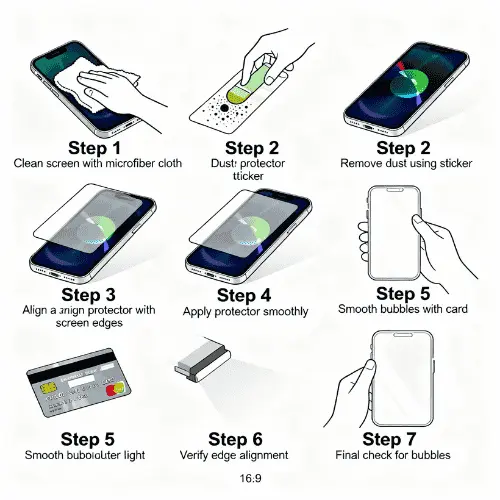
Even the best tempered glass screen protector is useless if you can’t install it properly. Follow this proven method for bubble-free results.
What You’ll Need
Included in Quality Kits:
- The screen protector itself
- Alcohol wipes
- Microfiber cloth
- Dust removal stickers
- Installation guide/tray
Additional Recommended Items:
- Masking tape (for dust removal)
- Well-lit workspace
- Squeegee card (often included)
Step 1: Prepare Your Workspace
Choose the Right Environment:
Never install screen protectors in dusty, humid, or outdoor environments. Dust particles are the enemy of perfect installation.
Best Location: Bathroom immediately after a hot shower (the steam settles airborne dust) or a clean kitchen counter.
Step 2: Clean Your Screen Thoroughly
This is the most critical step. 70% of installation problems stem from inadequate cleaning.
The Process:
- Turn off your iPhone
- Use the included alcohol wipe to clean the entire screen
- Wipe in circular motions, covering every millimeter
- Use the dry microfiber cloth to remove moisture
- Inspect under bright light for smudges or oils
- Use dust stickers to remove any particles
Pro Tip: Use short strips of masking tape to dab-remove stubborn dust specs. This works better than cloth.
Step 3: Use Alignment Tools Properly
If your phone screen protector includes an alignment tray (Spigen EZ Fit, Belkin Easy Align), this step is simple:
Tray-Based Installation:
- Place your iPhone in the alignment tray
- Remove the protective film from the tempered glass
- Lower the glass into the tray guides
- Press down gently in the center
- Watch as adhesive spreads automatically
Manual Alignment (No Tray):
- Remove just the bottom portion of the protective film
- Align the screen protector with your iPhone’s edges
- Start at one edge (usually top near speaker)
- Slowly lower the glass while peeling the rest of the film
- Let gravity and adhesive do most of the work
Step 4: Remove Air Bubbles
Small Bubbles (Under 2mm):
These often disappear on their own within 24-48 hours as adhesive settles.
Medium Bubbles:
- Use the included squeegee or your finger
- Push bubbles toward the nearest edge
- Apply firm but gentle pressure
- Work from center outward
Large Bubbles or Persistent Issues:
This usually means dust got underneath. You’ll need to:
- Gently lift the screen protector from the nearest edge
- Use dust removal stickers on both the glass and screen
- Slowly reapply
Warning: Only lift and reapply once or twice. Repeated attempts reduce adhesive effectiveness.
Step 5: Common Installation Mistakes to Avoid
❌ Rushing the cleaning process – Take your time here
❌ Installing in a dusty environment – Move to a cleaner space
❌ Touching the adhesive side – Handle only by edges
❌ Pressing too hard too quickly – Let adhesive spread naturally
❌ Ignoring alignment before setting – Check twice, stick once
❌ Giving up on small bubbles – Most disappear within 24 hours
Expert Quote: “The difference between a perfect installation and a frustrating one is 90% preparation and 10% application technique.” – Mobile repair technician with 10+ years experience
Common Problems and Solutions
Even with careful installation, you might encounter these issues. Here’s how to fix them.
Air Bubbles That Won’t Go Away
Problem: Large air pockets remain after 48 hours.
Cause: Dust particles, oils, or uneven adhesive application.
Solution:
- Lift the screen guard slowly from the nearest edge
- Clean the area under the bubble with a dust sticker
- Press down again while pushing air out
- If this doesn’t work after 2 attempts, replace the protector
Prevention: Clean your screen in a steam-filled bathroom or use compressed air.
Poor Adhesion and Lifting Edges
Problem: Edges of your tempered glass screen protector lift away from the screen.
Common Causes:
- Residual oils or moisture during installation
- Case pushing against the protector edges
- Low-quality adhesive
- Curved screen incompatibility
Solutions:
- For minor lifting: Apply gentle pressure for 30 seconds to reactivate adhesive
- For persistent lifting: Check if your case is too tight – try a case-friendly protector
- For quality issues: Contact the manufacturer for warranty replacement
Rainbow Effect (Newton Rings)
Problem: You see rainbow-colored patterns on your screen, especially with dark backgrounds.
Cause: Gap between the screen protector and display surface creates light interference.
Solutions:
- This usually appears with lower-quality protectors
- Premium brands like ZAGG, Spigen, and Belkin minimize this with better adhesives
- If it’s bothersome, upgrade to a higher-quality tempered glass screen protector
Touch Sensitivity Issues
Problem: Your iPhone doesn’t respond properly to touches or gestures.
Solutions:
- Go to Settings → Accessibility → Touch → enable “Touch Accommodations”
- Increase touch duration slightly
- For Touch ID issues: Delete and re-scan your fingerprints after protector installation
- Ensure your screen protector is 0.3mm or thinner
When to Replace: If sensitivity doesn’t improve after settings adjustments, your protector may be defective or too thick.
Fingerprint Scanner Problems (Touch ID)
Problem: Touch ID stops working or becomes unreliable after installing a screen protector.
The Fix:
This is actually common and easily solved:
- Go to Settings → Touch ID & Passcode
- Delete your existing fingerprints
- Add them again WITH the screen protector installed
- Scan your finger from multiple angles
Success Rate: This resolves Touch ID issues for 90%+ of users.
Dust Under the Protector
Problem: Dust particles trapped under your glass screen protector create spots or affect touch response.
Prevention is Key:
- Install in a clean, low-dust environment
- Use the included dust removal stickers liberally
- Consider the “bathroom steam method”
If Already Installed:
Small dust specks (1-2 particles) are usually livable. Multiple particles require reinstallation with proper cleaning.
Screen Protector Cracking Easily
Problem: Your tempered glass screen protector cracks from minor impacts.
What This Means:
Good news: The protector did its job! It absorbed the impact that would have cracked your actual iPhone screen.
Action Steps:
- Check if you have a warranty – ZAGG, Spigen, and others offer replacements
- Replace the cracked protector soon (cracks can spread and cut fingers)
- Consider upgrading to a thicker (0.4mm) tempered glass if cracks happen frequently
Screen Protector vs No Protection: Is It Really Worth It?
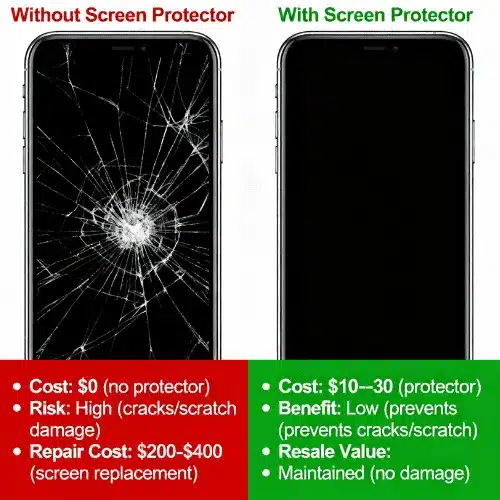
This is one of the most debated questions among iPhone users. Let’s examine the facts.
Understanding Ceramic Shield
Starting with iPhone 12, Apple introduced Ceramic Shield, which Apple claims offers 4x better drop performance. This technology infuses ceramic crystals into the glass at a molecular level.
What Ceramic Shield Actually Does:
- ✓ Improves shatter resistance from drops
- ✓ Maintains clarity and touch sensitivity
- ? Scratch resistance (controversial)
The Scratch Resistance Reality:
Despite Apple’s marketing, Ceramic Shield scratches at the same level as previous iPhone glass – around Mohs 6 hardness. This means:
- Keys and coins can still scratch it
- Sand (Mohs 7) definitely scratches it
- Everyday pocket debris causes micro-scratches
Drop Protection Benefits
With a Screen Protector:
Your tempered glass screen protector acts as a sacrificial layer, absorbing impact energy. When dropped:
- The protector shatters instead of your iPhone screen
- Impact force disperses across the glass surface
- Your actual display remains intact
- You replace a $20 protector instead of paying $200+ for screen repair
Without a Screen Protector:
Even minor drops can cause:
- Spider-web cracks across the display
- Dead pixels or touch sensitivity issues
- Complete screen failure requiring replacement
Cost-Benefit Analysis
Let’s do the math:
Investment in Protection:
- Quality iPhone screen protector: $20-40
- Total for 2 years (replacing 2-3 times): ~$60-80
Risk Without Protection:
- iPhone 16/15 screen repair at Apple: $279-379youtube
- Third-party repair: $150-250
- AppleCare+ deductible: $29 (but requires $200+ annual fee)
Break-Even Analysis:
You only need your screen protector to prevent ONE screen crack over your iPhone’s lifetime to make it worthwhile. Most quality protectors save your screen multiple times.
Resale Value Considerations
Pristine Screen (With Protector):
- Sells for 15-25% more on resale markets
- “Mint condition” commands premium prices
- Easier to sell quickly
Scratched Screen (No Protector):
- Buyers negotiate lower prices
- May be labeled “Good” instead of “Excellent” condition
- Reduces trade-in value at carriers and Apple
Real Example: An iPhone 14 Pro in “Excellent” condition (no scratches) sells for $650-700 on Swappa. The same model with screen scratches (“Good” condition) sells for $550-600. That’s a $50-100 difference – more than the cost of screen protectors over the phone’s life.
Expert Consensus
Tech reviewers and mobile repair professionals overwhelmingly recommend screen protection, even with Ceramic Shield:
- MacRumors forums: 78% of users report using screen protectors
- Reddit r/iPhone: Majority recommend at least tempered glass
- Mobile repair shops: Report that most cracked screens had no protection
The Verdict: Yes, a screen protector is worth it for 90% of iPhone users. The only exceptions might be:
- Users who replace phones annually and don’t care about resale
- Those with AppleCare+ who don’t mind deductibles and downtime
- People who never drop phones and keep them in pristine conditions (rare)
For more protection options, check our guide on Best iPhone 16 Pro Max Cases that pair perfectly with screen protectors.
Maintenance and Care Tips for Your Screen Protector
Once installed, proper care extends your screen protector’s lifespan and effectiveness.
Cleaning Your Screen Protector
Daily Cleaning:
- Use a microfiber cloth for fingerprints and smudges
- Avoid paper towels (too abrasive)
- Gentle circular motions work best
Deep Cleaning (Weekly):
- Use screen-safe cleaning solution or 70% isopropyl alcohol
- Spray onto microfiber cloth (never directly on screen)
- Wipe entire surface
- Dry with clean microfiber cloth
What to NEVER Use:
- ❌ Window cleaners (contain ammonia)
- ❌ Harsh chemicals
- ❌ Abrasive materials
- ❌ Excessive pressure
When to Replace Your Screen Protector
Signs It’s Time for a New One:
- Visible cracks or chips (replace immediately)
- Decreased touch sensitivity
- Excessive scratches affecting visibility
- Lifting edges that won’t re-adhere
- Rainbow effect or cloudiness
- Loss of oleophobic coating (constant fingerprints)
Average Lifespan:
- Budget protectors: 3-6 months
- Mid-range: 6-12 months
- Premium: 12-18+ months
With proper care, a quality tempered glass screen protector can last your iPhone’s entire lifecycle.
Removing Old Protectors Safely
The Safe Removal Method:
- Turn off your iPhone
- Find a corner or edge to lift
- Use your fingernail or a plastic card (never metal)
- Slowly peel at a 45-degree angle
- Apply steady, even pressure
- Clean adhesive residue with isopropyl alcohol
Pro Tip: Remove screen protectors slowly. Rushing can crack the glass into sharp shards.
Warranty Claims Process
If your screen protector arrives defective or cracks prematurely, most brands offer replacements:
ZAGG Lifetime Warranty:
- Visit zagg.com/warranty
- Submit claim with proof of purchase
- Pay shipping fee (~$6-8)
- Receive replacement in 7-10 days
Spigen GLAS Program:
- Register product at spigen.com
- Submit claim within warranty period
- Receive 50% discount code for replacement
- Order new protector at half price
Belkin Warranty:
Varies by product; typically 1-2 years for defects. Contact through Belkin.com support.
Frequently Asked Questions About iPhone Screen Protectors
What is the best screen protector for iPhone?
The best iPhone screen protector depends on your needs:
- Best Overall: Flolab NanoArmor 6 ($40) – highest test scores for protection and clarityyoutube
- Best Value: Spigen GlasTR EZ Fit ($16-25) – excellent quality with easy installation
- Best Budget: JETech Tempered Glass ($8-15) – affordable multi-packs without compromising basic protection
- Best Privacy: ZAGG Glass Elite Privacy 360 ($49) – 4-way privacy with premium protection
For detailed comparisons, check our Best Places to Buy Refurbished iPhone guide that includes accessory recommendations.
Does Apple replace screen protectors for free?
No, Apple does not replace screen protectors for free. However:
- Apple screen protector warranty covers manufacturing defects (not damage)
- Belkin screen protectors sold at Apple Stores have their own warranty
- Some Apple Stores offer professional installation for free when purchasing Belkin products
- AppleCare+ does NOT cover screen protector replacement
Alternative: Choose brands like ZAGG with lifetime replacement warranties.
Is it worth putting a screen protector on an iPhone?
Yes, absolutely. Here’s why:
- Cost Savings: A $20-40 screen protector can save you $200-400 in screen repair costsyoutube
- Resale Value: Protects your investment – pristine screens sell for 15-25% more
- Peace of Mind: Drop your phone without panic
- Scratch Prevention: Even Ceramic Shield scratches from everyday objects
The only reason NOT to use one: You replace your iPhone annually and don’t care about resale value.
What brand screen protectors does Apple sell?
Apple Stores primarily sell Belkin Screen Protector products:
- Belkin ScreenForce UltraGlass ($39.95+)
- Belkin UltraGlass Privacy ($44.95+)
- Belkin Anti-Glare options ($39.95+)
Why Belkin? Apple partnered with Belkin for their quality, customer service, and professional installation capability.
You can also find Apple screen protector options at:
- Best Buy (ZAGG, Spigen, OtterBox, Belkin)
- Amazon (all major brands)
- Carrier stores (various brands)
Which is better: Gorilla Glass or tempered glass?
Gorilla Glass is a brand name for chemically strengthened glass used in phone screens themselves (like your iPhone’s display).
Tempered glass is a heat-treatment process used for screen protectors.
The Comparison:
- Gorilla Glass (in your iPhone): Part of the device, permanent, Mohs 6 hardness
- Tempered Glass Protector: Removable, replaceable, typically 9H hardness on pencil scale
Bottom Line: They’re not directly comparable. Your tempered glass screen protector protects the Gorilla Glass (or Ceramic Shield) underneath. You want both working together.
What is the strongest glass screen protector?
Based on independent testing and material science:
By Material Strength:
- Aluminosilicate glass (ZAGG, OtterBox) – 5x stronger than standard glassyoutube
- Dual-ion exchange glass (Belkin UltraGlass) – 2x stronger than standard tempered glass
- Hybrid glass-polymer (some premium brands) – enhanced flexibility and impact resistance
By Test Performance:
Flolab NanoArmor 6 scored highest in comprehensive durability testing with 147N edge strength.youtube
Practical Consideration: Any quality 9H hardness screen protector from Spigen, ZAGG, Belkin, or OtterBox provides excellent protection for normal use.
Will a screen protector affect Face ID or Touch ID?
Face ID: No effect. Face ID uses infrared sensors that aren’t blocked by glass screen protectors.
Touch ID (Home Button): Modern tempered glass screen protectors don’t affect Touch ID IF you follow this step:
Critical Step After Installation:
- Go to Settings → Touch ID & Passcode
- Delete existing fingerprints
- Re-scan your fingerprints WITH the screen protector installed
This recalibrates Touch ID for the slight thickness change and resolves 90%+ of recognition issues.
Can I use any case with my screen protector?
Usually yes, but with caveats:
Compatible Cases:
- Most thin and medium cases work fine
- Best MagSafe Accessories are generally compatible
- Brands that specify “screen protector friendly”
Potential Issues:
- Ultra-thick cases (OtterBox Defender) may push against edge-to-edge screen protectors
- Cases with built-in screen covers
- Very tight-fitting cases on smaller protectors
Solution: Choose “case-friendly” screen protectors that are slightly smaller to avoid edge lifting.
Does a screen protector affect camera or photo quality?
No. Screen protectors cover only the display, not camera lenses. They have zero effect on photo or video quality.
Confusion Source: Some people mistakenly apply screen protectors over camera lenses. Don’t do this – cameras need optical clarity that screen protectors can’t provide.
For Camera Protection: Consider cases with raised camera lips or dedicated camera lens protectors (separate product).
Are privacy screen protectors worth it?
Yes, if you use your iPhone in public spaces frequently.
Best Use Cases:
- Office workers (protect sensitive emails/documents)
- Commuters on public transit
- Coffee shop workers
- Banking and financial professionals
- Anyone handling confidential information
Trade-offs:
- 10-15% brightness reduction
- Slight color tint (usually minimal)
- $10-20 more expensive than standard protectors
Market Growth: Privacy screen protector iPhone sales increased 26% in 2025, indicating growing concern about visual privacy.
How long do screen protectors last?
Average Lifespan by Type:
- Budget ($8-15): 3-6 months
- Mid-range ($15-25): 6-12 months
- Premium ($25-40+): 12-24 months
Factors Affecting Longevity:
- Usage intensity (heavy vs. light)
- Environmental conditions (outdoor work vs. office)
- Quality of oleophobic coating
- Proper installation and maintenance
Replacement Indicators:
- Visible cracks or chips
- Excessive scratches
- Loss of touch sensitivity
- Constant fingerprint accumulation (coating degraded)
For device maintenance tips, see our iPhone Repair Near Me Guide.
Conclusion: Protect Your Investment the Smart Way
Your iPhone is one of your most valuable possessions – both financially and functionally. A quality screen protector is the simplest, most cost-effective way to preserve its condition and your peace of mind.
Key Takeaways:
✓ Invest in quality: Spend $20-40 on proven brands (ZAGG, Spigen, Belkin) rather than $5 bargain options
✓ Choose the right type: Tempered glass screen protectors with 9H hardness offer the best protection for most users
✓ Installation matters: Take your time, clean thoroughly, and use alignment tools for bubble-free results
✓ Match your lifestyle: Privacy protectors for public use, anti-glare for outdoors, budget options for light users
✓ Look for warranties: Brands like ZAGG offer lifetime replacement, making premium prices worthwhile long-term
✓ Pair with cases: Combine your screen protector with quality cases from our Best iPhone 16 Pro Max Cases guide for complete protection
Our Top Recommendations for 2025:
- Best Overall: Spigen GlasTR EZ Fit ($16-25) – exceptional value with foolproof installation
- Best Premium: ZAGG Glass Elite ($39) – lifetime warranty and maximum protection
- Best Budget: JETech 3-Pack ($10) – affordable peace of mind
The Bottom Line: Even one prevented screen crack pays for years of screen protectors. With screen repairs costing $200-400, there’s simply no good reason to go without protection.youtube
Ready to protect your iPhone? Choose a screen protector that matches your needs, follow our installation guide, and enjoy worry-free smartphone use.

